




iPhone 11 IMEI Numbers: What They Are and How to Use Them Legally
iPhone 11 IMEI Numbers! Every iPhone 11 has a unique 15-digit identifier baked into its hardware—and understanding what it does (and doesn’t) allow you to do could save you from serious legal...

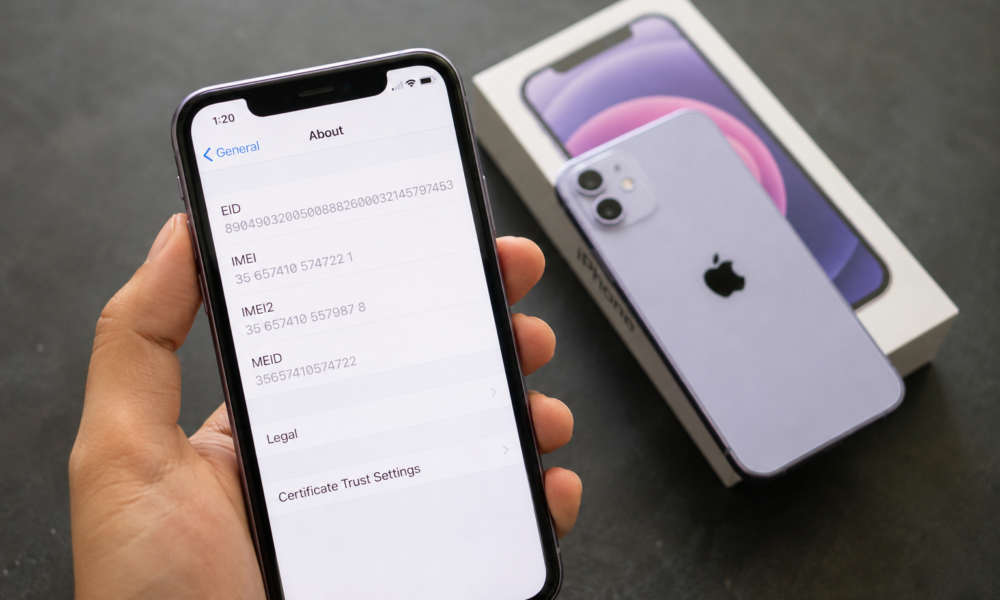
iPhone 11 IMEI Numbers! Every iPhone 11 has a unique 15-digit identifier baked into its hardware—and understanding what it does (and doesn’t) allow you to do could save you from serious legal trouble. This post breaks down exactly what an IMEI number is, how to find yours on an iPhone 11, and why “IMEI generators” are not the solution people think they are.
Table Of Content
- What Is an IMEI Number?
- IMEI and iPhone 11: Key Details
- How to find your iPhone 11 IMEI number
- IMEI vs. other iPhone identifiers
- Legal and Ethical Considerations Around IMEI Generators
- Legitimate Uses of IMEI Information
- Checking warranty status through Apple
- Verifying whether a device is blacklisted or stolen
- Contacting carriers for device-specific support
- Tracking a lost or stolen iPhone 11
- Common IMEI-Related Questions
- Can you legally change your iPhone 11’s IMEI number?
- How do you verify whether an IMEI number is legitimate?
- What should you do if your iPhone 11’s IMEI appears on a blacklist?
- FAQ
- Protect Your IMEI—and Know Your Rights
By the end, you’ll know how to use IMEI information legitimately—whether you’re checking a device before buying it secondhand, tracking a lost phone, or verifying warranty status through Apple.
What Is an IMEI Number?
An IMEI (International Mobile Equipment Identity) is a unique 15-digit number assigned to every mobile device. It identifies your specific iPhone 11 on cellular networks and cannot be legally changed or duplicated.
IMEI stands for International Mobile Equipment Identity. Every mobile device manufactured for cellular use is assigned one—and no two devices share the same number.
The 15 digits aren’t random. They follow a specific structure defined by the GSMA (Global System for Mobile Communications Association):
- Digits 1–8: The Type Allocation Code (TAC), which identifies the device’s manufacturer and model
- Digits 9–14: The serial number assigned to the specific unit
- Digit 15: A check digit, calculated using the Luhn algorithm to validate the number’s authenticity
When your iPhone 11 connects to a carrier’s network, the network reads this IMEI to verify the device is legitimate, unlocked, and not flagged as stolen or blacklisted. Remove or alter that number, and the phone essentially loses its ability to communicate with any network.
IMEI and iPhone 11: Key Details
How to find your iPhone 11 IMEI number
Apple makes it straightforward to locate your IMEI. There are three reliable methods:
- Settings app: Go to Settings > General > About. Scroll down until you see the IMEI field.
- SIM tray: On the iPhone 11, Apple engraved the IMEI directly onto the SIM card tray. Eject the tray and look at the back of it.
- Original packaging: The IMEI is printed on the barcode label on the box your iPhone 11 came in.
You can also dial *#06# on your iPhone’s keypad—the IMEI will appear on screen immediately.
IMEI vs. other iPhone identifiers
People often confuse the IMEI with similar-sounding identifiers. Here’s how they differ:
- IMEI: Identifies the physical hardware of the device. Network-level identification.
- Serial Number: Apple’s internal identifier for warranty and repair tracking.
- ICCID: Identifies the SIM card, not the device itself. It changes if you swap SIMs.
- MEID: An older identifier used in CDMA networks. Some iPhones display both IMEI and MEID.
For most practical purposes—buying a used iPhone, reporting theft, or checking blacklist status—the IMEI is the number you need.
Legal and Ethical Considerations Around IMEI Generators
This is where it’s important to be direct: IMEI generators are illegal.
An IMEI generator is a tool designed to produce fake, randomized 15-digit numbers that mimic the structure of real IMEI codes. People search for them hoping to obscure a device’s identity—typically to bypass a blacklist, deceive a carrier, or use stolen hardware without detection.
In the United States, tampering with an IMEI is a federal offense under 18 U.S.C. § 1028, which prohibits fraud related to identification documents and device identifiers. Many other countries have equivalent laws. The penalties can include substantial fines and imprisonment.
Beyond the legal risk, using a fake IMEI rarely works as intended. Carriers cross-reference IMEI numbers against databases maintained by organizations like the GSMA’s Device Check database. A generated number that doesn’t match a real device record gets flagged or rejected outright. Even if the number passes initial checks, the device can be blacklisted retroactively once the fraud is detected.
The consequences of IMEI manipulation include:
- Device blacklisting: The phone becomes permanently unusable on major carrier networks
- Criminal charges: Law enforcement can trace device activity back to the manipulated IMEI
- Carrier rejection: No legitimate network will activate a device with an unverifiable IMEI
- Civil liability: If a stolen device is involved, additional charges related to receiving stolen property may apply
There is no legitimate reason to generate a fake IMEI. Every valid use case for IMEI information—described below—works with the real number already assigned to your device.
Legitimate Uses of IMEI Information
Checking warranty status through Apple
Apple uses the IMEI (along with the serial number) to verify warranty coverage. Visit checkcoverage.apple.com, enter your iPhone 11’s IMEI or serial number, and Apple will confirm whether the device is still under the standard one-year warranty or covered by AppleCare+.
This is especially useful when purchasing a used iPhone 11—you can verify coverage before completing the transaction.
Verifying whether a device is blacklisted or stolen
Before buying any used iPhone, running an IMEI check is essential. A blacklisted device has been reported stolen, lost, or associated with unpaid carrier bills. Activating it on a new line is nearly impossible with major US carriers.
Several reputable third-party services—including IMEI.info and Swappa’s IMEI checker—allow you to run a free or low-cost check. You can also contact the carrier the device was originally activated on and ask them to run a status check.
Contacting carriers for device-specific support
When you call your carrier’s support line with a connectivity or activation issue, providing your IMEI allows the representative to pull up your device’s exact specifications, network compatibility profile, and account history. It significantly speeds up troubleshooting—especially for issues related to LTE band compatibility or SIM card activation errors.
Tracking a lost or stolen iPhone 11
If your iPhone 11 is lost or stolen, reporting the IMEI to your carrier gets the device blacklisted immediately, making it far less valuable to thieves. In the US, carriers share blacklist data through the CTIA’s Stolen Phone Checker database, which means a device blacklisted on AT&T is also blocked on Verizon, T-Mobile, and other participating networks.
You should also file a police report and include the IMEI number—law enforcement can use it to identify the device if it surfaces.
Common IMEI-Related Questions
Can you legally change your iPhone 11’s IMEI number?
No. Changing an iPhone’s IMEI is illegal in most jurisdictions, including the United States. Apple embeds the IMEI in both the hardware and firmware of the device. Even if someone were to technically modify the software-level IMEI display, the hardware identifier remains unchanged—and networks verify at the hardware level.
How do you verify whether an IMEI number is legitimate?
A legitimate IMEI will pass the Luhn algorithm check (many free online tools can run this instantly). More importantly, it will return a real result when queried against the GSMA’s device database or carrier systems—meaning it matches an actual manufactured device with a known model, manufacture date, and origin. A generated fake number may pass the algorithm check but will fail the database query.
What should you do if your iPhone 11’s IMEI appears on a blacklist?
Start by contacting the carrier that originally activated the device. Blacklistings sometimes occur in error—for example, a device reported lost that was later recovered, or one blacklisted due to a billing dispute that has since been resolved. Carriers can remove erroneous blacklistings with the right documentation. If the blacklisting is legitimate (the device is stolen), the correct step is to return the device to the original owner or surrender it to law enforcement.
FAQ
What does IMEI stand for on an iPhone 11?
IMEI stands for International Mobile Equipment Identity. It’s a unique 15-digit number assigned to your iPhone 11 that identifies the device on cellular networks globally.
Is it illegal to use an IMEI generator for an iPhone 11?
Yes. Using or distributing fake IMEI numbers is a federal offense in the United States under 18 U.S.C. § 1028, and similar laws apply in most other countries. The penalties can include fines and imprisonment.
How can I find my iPhone 11 IMEI without turning it on?
Check the SIM card tray—Apple engraves the IMEI on the back of it. The IMEI is also printed on the original product box.
Can a blacklisted iPhone 11 IMEI be removed from the blacklist?
In some cases, yes. If the blacklisting was an error—such as a device reported lost and then recovered—contact the original carrier with documentation. Legitimate blacklistings tied to theft generally cannot be reversed.
Why do carriers check IMEI numbers?
Carriers use IMEI numbers to verify that a device is legitimate, compatible with their network, and not flagged as stolen or associated with unpaid account balances. It’s a core part of how mobile networks maintain security.
ALSO READ : DB Technologies Ingenia IG2T Speaker: Design, Sound Quality & Key Features
Protect Your IMEI—and Know Your Rights
Your iPhone 11’s IMEI is more than just a number. It’s the foundation of how your device connects to the world, how Apple verifies its warranty, and how carriers and law enforcement track and recover stolen hardware.
The appeal of IMEI generators usually comes from a misunderstanding—people assume the number can be swapped out like a username. It cannot. The IMEI is tied to the physical device at a level that software tools cannot legitimately override, and attempting to do so carries serious legal consequences.
The legitimate reasons to engage with IMEI data are practical and straightforward: check your device before buying it used, report it stolen if lost, verify warranty coverage, or troubleshoot carrier issues. All of these work with your real IMEI—no generator required.
If you suspect someone is attempting to sell you a device with a manipulated or fake IMEI, report it to your local carrier and, if theft is involved, to law enforcement. Protecting the integrity of device identification systems benefits everyone who owns a smartphone.




No Comment! Be the first one.