




10 Online Privacy Tips Everyone Should Know in 2026
Online Privacy Tips! Online privacy threats are growing fast. From data breaches to phishing scams, protecting your personal information requires more than just a strong password. This guide covers...

Online Privacy Tips! Online privacy threats are growing fast. From data breaches to phishing scams, protecting your personal information requires more than just a strong password. This guide covers 10 actionable tips—including using a VPN, enabling two-factor authentication, and encrypting your messages—to help you stay safe online in 2026.
Table Of Content
- Why Online Privacy Matters More Than Ever in 2026
- Tip 1: Use Strong, Unique Passwords for Every Account
- Why password strength is still your first line of defense
- How to create a secure password
- Recommended password managers
- Tip 2: Enable Two-Factor Authentication (2FA) on All Accounts
- How two-factor authentication adds an extra security layer
- How to set up 2FA on major platforms
- Best 2FA apps
- Tip 3: Review and Tighten Your Social Media Privacy Settings
- What your default privacy settings are actually sharing
- What to do right now
- Conduct a quarterly privacy audit
- Tip 4: Use a VPN to Encrypt Your Online Activity
- How a VPN protects your internet privacy
- Top VPN services compared
- Tip 5: Keep Your Software and Devices Updated
- Why security patches matter
- How to stay current without the hassle
- Tip 6: Recognize and Avoid Phishing Attacks
- What phishing looks like in 2026
- How to spot a phishing attempt
- What to do before clicking any link
- Tip 7: Limit What Data Apps Can Access on Your Phone
- How apps collect more data than you realize
- How to audit app permissions
- Tools that help monitor data collection
- Tip 8: Switch to Encrypted Messaging Apps
- Why end-to-end encryption matters for your messages
- The best encrypted messaging apps in 2026
- Tip 9: Clear Cookies and Browsing Data Regularly
- How cookies track your behavior across the web
- Practical steps to reduce cookie tracking
- Tip 10: Monitor Your Financial Accounts for Unauthorized Activity
- Why early detection is critical
- How to monitor your financial health
- Recommended credit monitoring tools
- Your Online Privacy Action Plan for 2026
- Frequently Asked Questions About Online Privacy in 2026
Your personal data has never been more valuable—or more vulnerable. According to IBM’s Cost of a Data Breach Report 2024, the average cost of a data breach reached $4.88 million globally, a 10% increase from the previous year. For everyday users, the consequences are just as real: stolen identities, drained bank accounts, and compromised personal communications.
The digital threats of 2026 are more sophisticated than ever. AI-powered phishing attacks, invasive app permissions, and relentless data brokers have made casual internet browsing a potential liability. Yet most people still rely on a single password across multiple accounts or skip security updates without a second thought.
The good news? You don’t need to be a cybersecurity expert to protect yourself. These 10 practical, proven online privacy tips will give you a clear roadmap to securing your digital life—starting today.
Why Online Privacy Matters More Than Ever in 2026
The scale of the problem is staggering. According to Statista, over 6 billion records were exposed in data breaches in 2023 alone—and that number has continued climbing. Meanwhile, the rise of generative AI has made it easier for bad actors to craft convincing scams, fake identities, and targeted attacks.
Governments are responding with stricter data protection regulations, including expansions of GDPR enforcement in Europe and evolving state-level privacy laws in the US. But regulation alone won’t protect you. Personal responsibility remains your strongest defense.
Here’s what you need to know.
Tip 1: Use Strong, Unique Passwords for Every Account
Why password strength is still your first line of defense
Weak passwords remain one of the most common causes of account breaches. A 2023 report by NordPass found that “123456” was still the world’s most commonly used password—used by over 4.5 million people. If a hacker gains access to one account, reused passwords make it trivially easy to break into others.
How to create a secure password
- Use at least 16 characters
- Mix uppercase and lowercase letters, numbers, and symbols
- Avoid personal information like birthdays or names
- Never reuse the same password across multiple sites
Recommended password managers
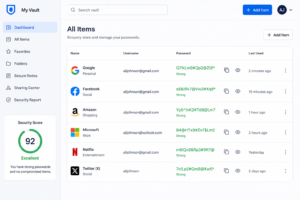
Managing dozens of unique passwords is impossible without help. Password managers generate and store complex passwords securely.
|
Tool |
Free Plan |
Starting Price |
Platform |
|---|---|---|---|
|
No |
$2.99/month |
All platforms |
|
|
Yes |
$10/year |
All platforms |
|
|
Yes (limited) |
$4.99/month |
All platforms |
|
|
Yes (limited) |
$1.49/month |
All platforms |
Tip 2: Enable Two-Factor Authentication (2FA) on All Accounts
How two-factor authentication adds an extra security layer
Two-factor authentication (2FA) requires you to verify your identity using two separate methods—typically your password plus a one-time code. Even if someone steals your password, 2FA blocks unauthorized access.
According to Microsoft, enabling 2FA blocks over 99.9% of automated cyberattacks. That statistic alone makes it one of the highest-impact steps you can take.
How to set up 2FA on major platforms
Most major platforms—Google, Facebook, Apple, Twitter/X, and banking apps—offer 2FA under Security Settings. Look for options like “Two-Step Verification” or “Authenticator App.”
Best 2FA apps
|
App |
Type |
Platform |
|---|---|---|
|
TOTP |
iOS, Android |
|
|
TOTP + Backup |
iOS, Android, Desktop |
|
|
TOTP |
iOS, Android |
Avoid SMS-based 2FA where possible—SIM-swapping attacks can intercept text messages. App-based authenticators are far more secure.
Tip 3: Review and Tighten Your Social Media Privacy Settings
What your default privacy settings are actually sharing
Social media platforms default to maximum data sharing—not maximum privacy. Your location, contact list, date of birth, workplace, and browsing behavior may all be visible to third parties by default.
What to do right now
- On Facebook: Go to Settings → Privacy → Review who can see your posts, friend list, and contact details
- On Instagram: Switch to a private account and disable “Allow others to find you by phone number”
- On LinkedIn: Limit profile visibility to connections only and opt out of data sharing for ads
- On X (Twitter): Disable location tagging and restrict data sharing in privacy settings
Conduct a quarterly privacy audit
Set a calendar reminder every three months to review your settings. Platforms frequently update their privacy policies, and new data-sharing options can appear without notice.
Tip 4: Use a VPN to Encrypt Your Online Activity
How a VPN protects your internet privacy
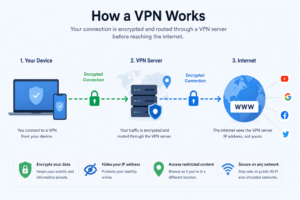
A Virtual Private Network (VPN) encrypts your internet traffic and masks your IP address, making it significantly harder for ISPs, advertisers, or hackers—especially on public Wi-Fi—to monitor your activity.
Top VPN services compared
|
VPN |
No-Log Policy |
Speed |
Starting Price |
Best For |
|---|---|---|---|---|
|
Yes |
Excellent |
$6.67/month |
All-around use |
|
|
Yes |
Very Good |
$3.99/month |
Privacy focus |
|
|
Yes |
Good |
$2.49/month |
Budget option |
|
|
Yes |
Good |
Free / $4.99/month |
Privacy-first |
Always choose a VPN with a verified no-log policy—meaning the provider does not store records of your browsing activity.
Tip 5: Keep Your Software and Devices Updated
Why security patches matter
Software updates do more than add new features—they patch known security vulnerabilities. Cybercriminals actively exploit outdated software. The infamous WannaCry ransomware attack in 2017 succeeded primarily because organizations had failed to install an available Windows security update.
How to stay current without the hassle
- Enable automatic updates on all devices: smartphones, laptops, tablets, and routers
- Don’t ignore browser extension updates—these are frequently exploited
- Replace devices that no longer receive manufacturer security support
This is one of the simplest online privacy tips, and one of the most consistently ignored.
Tip 6: Recognize and Avoid Phishing Attacks
What phishing looks like in 2026
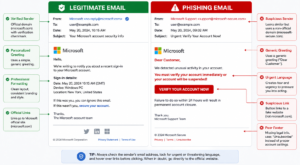
Phishing has evolved. AI-generated emails now perfectly mimic the tone, formatting, and branding of legitimate companies. Spear phishing targets you specifically, using personal information scraped from social media to increase credibility.
How to spot a phishing attempt
- Urgency or threats (“Your account will be closed in 24 hours”)
- Mismatched or spoofed sender email addresses
- Links that don’t match the company’s actual domain
- Requests for passwords, payment info, or personal details
What to do before clicking any link
Hover over links to preview the URL. Use free tools like Google Safe Browsing or VirusTotal to check suspicious links before opening them. Report phishing emails to your email provider and to the Anti-Phishing Working Group at reportphishing@apwg.org.
Tip 7: Limit What Data Apps Can Access on Your Phone
How apps collect more data than you realize
Many apps request permissions far beyond what they need to function. A flashlight app has no legitimate reason to access your contacts or location. Yet millions of users grant these permissions without reading them.
How to audit app permissions
- iPhone: Go to Settings → Privacy & Security → review each permission category
- Android: Go to Settings → Apps → Permissions Manager
Revoke any permissions that seem unnecessary. Pay particular attention to:
- Location access (set to “While Using” rather than “Always”)
- Microphone and camera access
- Contact and calendar access
Tools that help monitor data collection
- Exodus Privacy – analyzes Android apps for trackers
- DuckDuckGo Privacy Browser – blocks trackers automatically while browsing
Tip 8: Switch to Encrypted Messaging Apps
Why end-to-end encryption matters for your messages
Standard SMS messages are not encrypted. Telecom providers, governments, and in some cases hackers can access them. End-to-end encryption ensures that only the sender and recipient can read a message—not the platform, not your carrier.
The best encrypted messaging apps in 2026
|
App |
Encryption |
Open Source |
Platform |
|---|---|---|---|
|
End-to-end |
Yes |
iOS, Android, Desktop |
|
|
End-to-end |
No |
iOS, Android |
|
|
Optional (Secret Chats only) |
Partial |
iOS, Android, Desktop |
|
|
End-to-end |
Yes |
Web, iOS, Android |
Signal is widely regarded by security researchers as the gold standard for private messaging. For email, ProtonMail provides end-to-end encryption with zero-access architecture.
Tip 9: Clear Cookies and Browsing Data Regularly
How cookies track your behavior across the web
Cookies are small files stored by your browser that track your activity—what you click, what you buy, and what you search. Third-party cookies, in particular, follow you across websites, feeding data to advertisers and data brokers.
Practical steps to reduce cookie tracking
- Clear cookies and cache monthly (or set your browser to do it automatically)
- Use privacy-focused browsers like Firefox or BraveBraveBrave
- Install browser extensions like uBlock Origin or Privacy Badger to block trackers
- Use private/incognito mode for sensitive searches (note: this doesn’t hide activity from your ISP)
Most browsers allow you to block third-party cookies entirely under Privacy Settings. This is an easy win worth doing today.
Tip 10: Monitor Your Financial Accounts for Unauthorized Activity
Why early detection is critical
Financial fraud moves fast. The sooner you detect unauthorized activity, the easier it is to limit the damage. According to the Federal Trade Commission (FTC), consumers reported losing over $10 billion to fraud in 2023—a historic high.
How to monitor your financial health
- Set up real-time alerts for all bank and credit card transactions
- Review your credit report regularly via AnnualCreditReport.com (free in the US)
- Use credit monitoring services for continuous oversight
Recommended credit monitoring tools
|
Tool |
Free Option |
Key Features |
|---|---|---|
|
Yes |
Credit score tracking, alerts |
|
|
Yes (limited) |
Dark web monitoring, credit lock |
|
|
No |
AI-powered identity monitoring |
|
|
No |
All-in-one financial + identity protection |
Your Online Privacy Action Plan for 2026
Online privacy is not a one-time setup—it’s an ongoing practice. The threats evolve, platforms change their policies, and new vulnerabilities emerge every year. But you don’t need to implement everything at once.
Start with the highest-impact steps: a password manager, 2FA on your most critical accounts, and a VPN for daily browsing. From there, work through the remaining tips at your own pace.
Here’s a quick reference summary of everything covered:
|
# |
Tip |
Priority |
|---|---|---|
|
1 |
Use strong, unique passwords |
🔴 High |
|
2 |
Enable two-factor authentication |
🔴 High |
|
3 |
Review social media privacy settings |
🔴 High |
|
4 |
Use a VPN |
🟡 Medium |
|
5 |
Keep software updated |
🔴 High |
|
6 |
Avoid phishing attacks |
🔴 High |
|
7 |
Limit app permissions |
🟡 Medium |
|
8 |
Use encrypted messaging |
🟡 Medium |
|
9 |
Clear cookies and tracking data |
🟢 Low |
|
10 |
Monitor financial accounts |
🔴 High |
Pick three tips from this list and implement them before the end of the week. Your future self will thank you.
Frequently Asked Questions About Online Privacy in 2026
What is the most important online privacy tip for beginners?
Start with two-factor authentication and a password manager. These two steps alone prevent the majority of common account breaches and require minimal technical knowledge to set up.
Is a free VPN safe to use?
Most free VPNs monetize your data—the very opposite of privacy. If cost is a concern, ProtonVPN offers a genuinely free tier with a strict no-log policy. For regular use, a paid VPN like NordVPN or ExpressVPN is a worthwhile investment.
How often should I change my passwords?
Modern security guidance from NIST (National Institute of Standards and Technology) no longer recommends changing passwords on a fixed schedule. Instead, change a password immediately if: you suspect a breach, your password manager flags it as compromised, or the service has been hacked.
Can I be tracked even when using a VPN?
A VPN hides your IP address and encrypts your traffic, but it doesn’t make you completely anonymous. Browser fingerprinting, cookies, and logged-in accounts can still identify you. Use a VPN alongside a privacy-focused browser and tracker-blocking extensions for stronger protection.
What is the difference between privacy and security online?
Online security refers to protecting your accounts and devices from unauthorized access (e.g., through strong passwords and 2FA). Online privacy refers to controlling what personal data is collected and shared about you (e.g., through VPNs, encrypted messaging, and limiting app permissions). Both matter—and many of the best practices overlap.
How do I know if my data has already been breached?
Use Have I Been Pwned—a free tool that checks whether your email address appears in known data breaches. If your address appears, change the passwords for affected accounts immediately and enable 2FA.




No Comment! Be the first one.